Admin
The Admin page provides access to server status and administrative controls:\
- Server status and version
- System resources
- User management
- User group management
- License upload
- VOD mission control
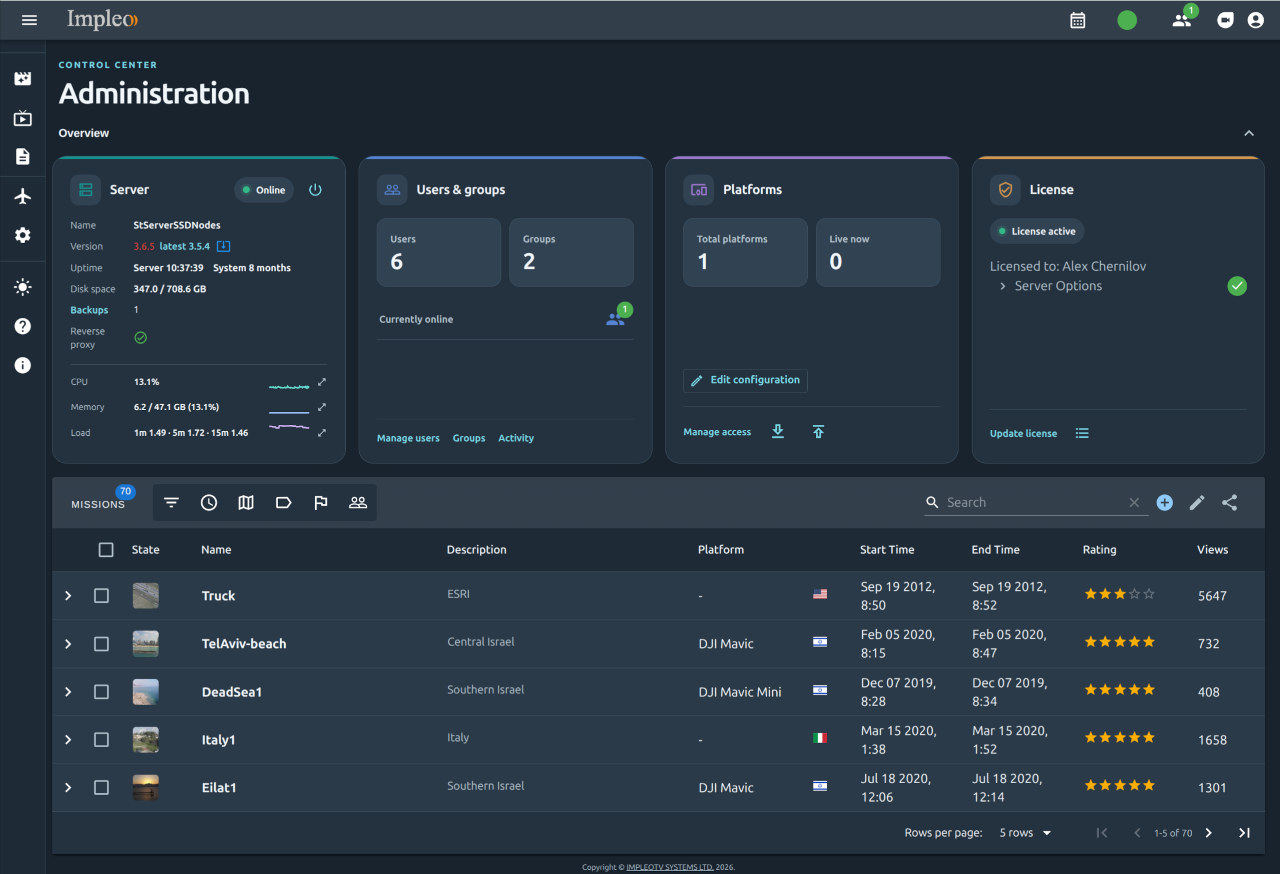
The page is available to users with administrative privileges. Group administrators have access to a subset of these controls.
Logging
STServer records events in these log files:
- StServer.log - server logs
- RecorderProc.log - recorder logs
Logging visitors with IP Address Geolocation
STServer can use an IP geolocation service to report a visitor’s approximate location. Configure the provider and your API key in the geolocation section of data/config.json when enabling this service.
The following services are currently supported:
File /data/config.json
Set use to ipapi or ipstack:
"geolocation": {
    "use" : "ipapi",
    "ipstack_api_access_key": "YOUR_IPSTACK_API_KEY"
  },
Editing platforms configuration
Administrators and super administrators can select Edit configuration in the Platforms card. The Platforms tab provides platform and sensor forms; use Advanced parameters for extra YAML settings and Raw YAML for the complete file. Apply advanced parameter edits before saving. Comments, extension properties, and include references are retained; included files themselves are not edited.
Save is enabled only for a changed draft that passes backend validation. Cancel asks before discarding changes. If another administrator changes the file, reload it before saving. Names use the existing server normalization (spaces become underscores, slashes become hyphens); the editor shows the effective name.
Saving closes every live recorder and waits up to 60 seconds for exit. It stops
running preview containers, backs up the previous file to platforms.yml.old,
replaces the configuration, reloads STServer/AIS, and starts the previews again.
Recordings remain stopped and must be started explicitly. Previously stopped
preview containers remain stopped. A failed reload attempts to restore the
previous configuration and previews; the dialog reports any recovery failure and
keeps the draft. A recorder shutdown timeout never force-kills recorder workers.
Preview container control
The supplied Docker Compose configuration mounts /var/run/docker.sock into
STServer. Docker socket access grants the backend host-level Docker control;
container targets are fixed by server configuration and cannot be supplied in an
HTTP request. The editor APIs are restricted to administrators. No Docker CLI is
needed. Recreate the STServer container after changing its mounts/environment.
Configuration variables:
| Variable | Default / behavior |
|---|---|
PLATFORM_CONFIG_RESTART_PREVIEWS |
true in Compose; otherwise infer required services from enabled preview modes. Set false only for recording-only deployments. |
PLATFORM_CONFIG_DOCKER_SOCKET |
/var/run/docker.sock (use a different path for a rootless daemon if needed). |
PLATFORM_CONFIG_SUPERVISOR_CONTAINER |
stsupervisor |
PLATFORM_CONFIG_WEBRTC_CONTAINER |
stanag2webrtc |
PLATFORM_CONFIG_SUPERVISOR_URL |
http://127.0.0.1:8065/supervisor/platforms (or configured SUPERVISOR_PORT). |
PLATFORM_CONFIG_WEBRTC_URL |
http://127.0.0.1:8081/api/active-sensors |
Preview URLs are backend-to-service configuration endpoints, not browser URLs.
The containers must mount the same configuration directory. Save is refused
before shutdown if Docker or a required container is unavailable. Preview shutdown
has a 30-second grace period; readiness is checked for up to 60 seconds, including
loaded channel names and URLs. Allow at least 360 seconds for this synchronous
request in reverse proxies (for Nginx, proxy_read_timeout 360s;). Recovery can add
time to an unsuccessful save. STServer continues serving other requests during
reload but temporarily rejects new recording starts.
The editor uses the configured --platformConfig path, defaulting to
data/platforms.yml. Directory-based watching handles atomic replacements, and
externally written valid configurations use the same recording/reload lifecycle.
Invalid external YAML keeps the last working runtime configuration loaded.