Websockets interface
StPlayer goes beyond being a powerful STANAG player by offering advanced automation capabilities and seamless integration with custom applications. One of its key features is a built-in WebSockets server, which provides a robust communication channel between the player and external systems. By connecting to this server, users can enable automation through real-time notifications about specific events. These events can trigger actions in custom applications, allowing for intelligent, dynamic control of media playback.
Whether synchronizing media with other devices, integrating with automation systems, or creating personalized workflows, StPlayer enables users to tailor their media experience to specific needs and integrate it smoothly into existing applications and environments.
StPlayer’s WebSockets server uses a standard interface, allowing easy connections from desktop or browser-based applications. Clients simply specify the server’s URL—consisting of an HTTP address, port, and service path—to establish a persistent connection. Once connected, clients receive real-time events, supporting an interactive, integrated media experience.
Configuring websockets interface
You can enable or disable the WebSocket interface using the corresponding checkbox, as well as set the service URL. Please note that in order to configure the URL, you should uncheck the checkbox first.
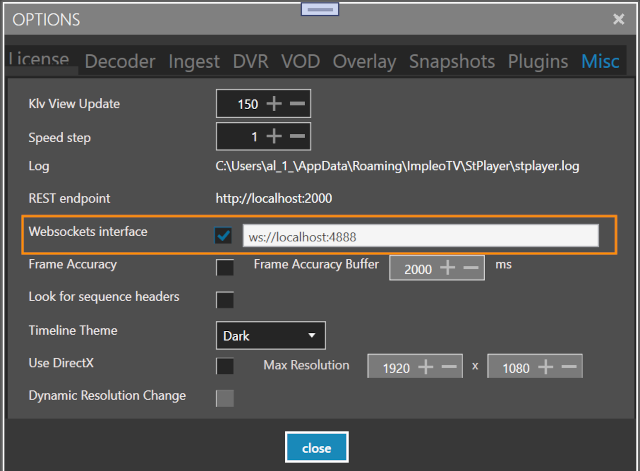
Service endpoints
ScreenCoord
screenCoord endpoint allows client to receive (in json format) the information on the mouse events. Two events are supported:
- Mouse move
- Mouse down
For example:
{
  "event": "MouseMove",
  "screenCoord": {
    "X": 198.0,
    "Y": 484.0,
    "Width": 1254.0,
    "Height": 707.33333333333337
  },
  "geoCoord": {
    "Lat": -31.077997416828886,
    "Lon": 150.4629037274957,
    "Alt": "NaN"
  },
  "klvs": {
    "2": 1283400393674348,
    "65": 3,
    "3": "test",
    "10": "15HD BN-2T",
    "5": 230.91417,
    "6": 7.3512986,
    "7": -0.2182073,
    "11": "EOW",
    "12": "Geodetic WGS84",
    "13": -31.0436365758,
    "14": 150.4924047228,
    "15": 2651.85,
    "16": 40.5127,
    "17": 22.7887,
    "18": 0.1406249498,
    "19": -24.0828857124,
    "20": 359.5324098317,
    "21": 5836.0305,
    "22": 4126.5,
    "23": -31.073764572399998,
    "24": 150.4489174813,
    "25": 272.71,
    "26": -0.0161184,
    "27": 0.0002426,
    "28": 0.0034814,
    "29": -0.0182836,
    "30": 0.0100757,
    "31": 0.0041131,
    "32": 0.0014191,
    "33": 0.0122959,
    "40": -31.073764572399998,
    "41": 150.4489174813,
    "42": 272.71,
    "56": 47,
    "57": 5329.0336,
    "1": 54172
  },
  "time": "2010-09-02T04:06:33.674348Z",
  "pcktNumber": 16
}
Note. To retrieve KLVs, the Recasting option must be enabled in your license. If geo coordinates cannot be calculated, the geoCoord entry will be omitted.
Mouse Event Report Format
The WebSocket message includes the following fields:
-
event — The event type: either
MouseMoveorMouseDown.By default, only
MouseDownevents are reported.
To receive both events, set theWebSocketReportBothMouseDownAndMovevalue totruein the
C:\Program Files\ImpleoTV\StPlayer\Bin\x64\StPlayerApp.exe.configfile. -
screenCoord — Contains the actual video window's width and height, as well as the X and Y position within this window.
The current video resolution can be obtained using the REST API.
Note: This information is available only when the Overlay Tools option is enabled. -
geoCoord — The geographic coordinates of the selected point.
These are calculated using metadata (excluding DTM). If necessary metadata is missing, geo coordinates will not be available.
Important: Accuracy depends on the metadata quality; exact positioning is not guaranteed. -
time — Timestamp, derived from KLV tag 2.
-
pcktNumber — The KLV packet number corresponding to this event.
lastPacketGeoJson
The lastPacketGeoJson endpoint allows the client to receive information about the most recently updated KLV packet in GeoJSON format. The maximum rate at which StPlayer sends GeoJSON packets can be configured in the StPlayerApp.exe.config file using the MaxLastPacketGeoJsonUpdateRate parameter (in milliseconds). This setting lets you control the frequency of packet delivery.
Note: Metadata recasting information is available only with the Metadata Recaster option.
Example:
{
  "type": "FeatureCollection",
  "features": [
    {
      "type": "Feature",
      "geometry": {
        "type": "Point",
        "coordinates": [
          150.4909894385,
          -31.0454143356
        ]
      },
      "properties": {
        "description": " Mission Id: test",
        "title": " Platform: 15HD BN-2T Mission Id: test",
        "name": "Sensor",
        "marker-symbol": "camera"
      }
    },
    {
      "type": "Feature",
      "geometry": {
        "type": "LineString",
        "coordinates": [
          [
            150.4909894385,
            -31.0454143356
          ],
          [
            150.4476808153,
            -31.0759667079
          ]
        ]
      },
      "properties": {
        "name": "CameraToTargetLine",
        "stroke-width": 1,
        "stroke-opacity": 1,
        "stroke": "#ff0000"
      }
    },
    {
      "type": "Feature",
      "geometry": {
        "type": "Polygon",
        "coordinates": [
          [
            [
              150.43868321530002,
              -31.1221084079
            ],
            [
              150.3933495153,
              -31.074462907900003
            ],
            [
              150.4570836153,
              -31.055513207900002
            ],
            [
              150.4728288153,
              -31.0720550079
            ],
            [
              150.43868321530002,
              -31.1221084079
            ]
          ]
        ]
      },
      "properties": {
        "name": "Footprint",
        "stroke": "#0000ff",
        "stroke-width": 2,
        "fill-opacity": 0
      }
    },
    {
      "type": "Feature",
      "geometry": {
        "type": "LineString",
        "coordinates": [
          [
            150.4909894385,
            -31.0454143356
          ],
          [
            150.4476808153,
            -31.0759667079
          ]
        ]
      },
      "properties": {
        "name": "CameraToFrameCenter",
        "stroke-width": 1,
        "stroke-opacity": 1,
        "stroke": "#0000ff"
      }
    }
  ]
}
Rendered GeoJSON Output:
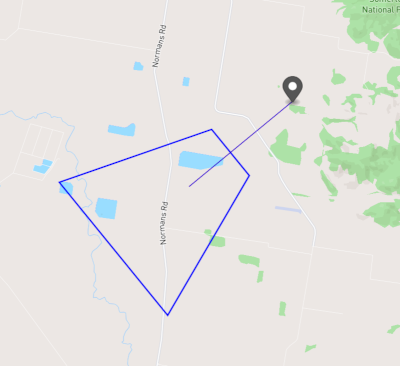
If the geo coordinates cannot be calculated, the GeoJSON will be an empty JSON object.
Connecting to the services
Here is an example (in js) of how to connect to the service:
import WebSocket from  'ws';

// Create a new WebSocket connection to the screenCoord interface
const socket = new WebSocket('ws://localhost:4888/screenCoord');

// Or create a new WebSocket connection to the lastPacketGeoJson interface
//const socket = new WebSocket('ws://localhost:4888/lastPacketGeoJson');


// Event handler for successful connection
socket.on('open', () => {
  console.log('Connected to the server');
});

// Event handler for incoming messages
socket.on('message', (message) => {

    // Parse the message as JSON
    try {
      const json = JSON.parse(message);
      console.log('Parsed JSON:', JSON.stringify(json));
    } catch (error) {
      console.error('Error parsing JSON:', error);
    }
});

// Event handler for connection errors
socket.on('error', (error) => {
  console.error('WebSocket error:', error);
});

// Event handler for connection close
socket.on('close', (event) => {
  console.log('Connection closed:');
});

// Send a message to the server
function sendMessage(message) {
  socket.send(message);
}
The demo project source is located in the /WebSocketClientDemo directory.