Session Configuration
Processing Configuration
You can configure various processing parameters in the Session Config window.
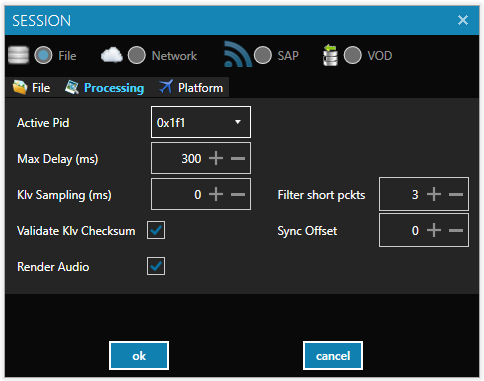
- Active PID: Select the KLV data stream (in case multiple streams are present).
- Max Delay: Sets the allowed sync delay between video and metadata. Applicable in push (streaming) mode only.
⚠️ Increasing this value improves sync robustness but also increases latency.
- KLV Sampling: Configure the player to provide only a subset of metadata by sampling packets (minimum interval between packets).
- Filter Short Packets: Filter packets that contain only timing or security metadata. You can set a minimum number of tags required in a packet.
- Sync Offset: Allows fine-tuning of video and metadata synchronization.
- Checksum Validation: By default, the player validates the checksum of KLV packets and discards any with invalid checksums.
⚠️ You may disable this for debugging purposes, but doing so could cause application crashes.
- Disable Audio: Useful for processing UAV video streams that do not contain audio.
Using Configurations
StPlayer allows saving and reusing session configurations. All session parameters are saved in a .cfg file (JSON format), optionally accompanied by:
.dbfile (for extracted metadata).sqlitefile (for geo-related info)
Available Commands (Main Menu)
- Load Session
- Save Session As...
Recent sessions can be accessed quickly via the Recent Sessions menu.
Once a configuration is created or loaded, it becomes the current configuration. All further changes are saved to it automatically.