Player Automation
🧾 Passing Command-Line Arguments
StPlayer allows an automation script to pass command-line arguments to the application.
| Command | Description | Example |
|---|---|---|
-c, --config |
Initial configuration | -c C:\\Movie\\test.cfg |
-i, --input |
File or stream url | -i C:\\Movie\\test.ts |
-k, --klvWindow |
Open Klv window | -k or --klvWindow |
-m, --mapWindow |
Open Map window | -m or --mapWindow |
-p, --position |
Start position, seconds (files only) | -p 60 or --position 60 |
-x, --xAppWindow |
Initial app window X offset | -x 100 or --xAppWindow 100 |
-y, --yAppWindow |
Initial app window Y offset | -y 100 or --yAppWindow 100 |
-w, --widthAppWin |
Initial app window width | -w 640 or --widthAppWin 640 |
-h, --heightAppWin |
Initial app window height | -h 480 or --heightAppWin 480 |
Note: When playback starts, Width and Height are automatically adjusted to the video aspect ratio.
📄 Example
StPlayer.exe -i c:\\Movie\\test.ts -p 60 -k -m
You can also simply pass a .ts file path or a stream URL, if the above options are not needed:
📁 File:
StPlayer.exe c:\\Movie\\test.ts
🌐 Stream:
StPlayer.exe udp://227.1.1.1:30120
With Network Interface:
StPlayer.exe udp://227.1.1.1:30120/nic=192.168.1.10
⚙️ Workflow Automation
StPlayer comes with a workflow execution engine that allows you to automate some of the basic tasks. You can use this API to open, start/pause/stop playback, open application's windows, etc. In addition you can manage playback configurations, fully automating your workflow. The APIs provide the ability to tightly integrate the StPlayer into external processes and eliminate manual steps.
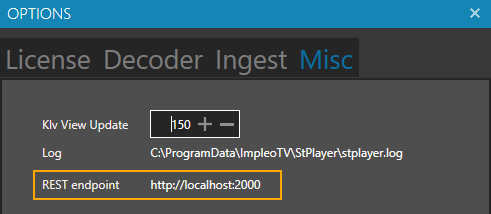
REST endpoint is automatically selected based on the available port and can be found at Options->Misc
ℹ️ Info Methods
| Method | Type | Description |
|---|---|---|
status |
GET | Get current status |
session |
GET | Get current configuration |
▶️ Action Methods – Playback
| Method | Type | Description |
|---|---|---|
open |
POST | Open file / stream |
load |
POST | Load configuration |
start |
POST | Start / resume command |
pause |
POST | Pause command |
seek |
POST | Seek command |
stop |
POST | Stop command |
close |
POST | Close player |
🛰️ Action Methods – KlvMonitor
| Method | Type | Description |
|---|---|---|
open |
POST | Open klvmonitor |
close |
POST | Close klvmonitor |
🗺️ Metadata Methods – GeoJson
| Method | Type | Description |
|---|---|---|
lastPacketGeoJson |
GET | Get Last Klv packet as GeoJson |
🗺️ Action Methods – Map
| Method | Type | Description |
|---|---|---|
open |
POST | Open map |
close |
POST | Close map |
📸 Action Methods – Snapshot
| Method | Type | Description |
|---|---|---|
snapshot |
POST | Take snapshot |
Snapshot picture/metadata format is selected based on current configuration.
🎛️ Action Methods – Hide/Show Buttons
| Method | Type | Description |
|---|---|---|
hidebuttons |
POST | Hide buttons |
showbuttons |
POST | Show buttons |
UI Control Configuration:
<setting name="HiddenButtons" serializeAs="Xml">
  <value>
    <ArrayOfString xmlns:xsi="http://www.w3.org/2001/XMLSchema-instance" xmlns:xsd="http://www.w3.org/2001/XMLSchema">
      <string>StepBackward</string>
      <string>Play</string>
      <string>StepForward</string>
      <string>Pause</string>
      <string>Live</string>
      <string>Stop</string>
      <string>Rate</string>
      <string>GotoTime</string>
      <string>GoToTimePicker</string>
      <string>Bookmarks</string>
      <string>ScreenShot</string>
      <string>Query</string>
      <string>CutClip</string>
      <string>FullScreen</string>
      <string>Record</string>
      <string>KlvMonitor</string>
      <string>Map</string>
      <string>Overlay</string>
      <string>OverlayToolbox</string>
      <string>Annotations</string>
    </ArrayOfString>
  </value>
</setting>
<setting name="HideButtons" serializeAs="String">
  <value>False</value>
</setting>
Examples
📡 Get status
Command (GET)
http://localhost:2000/status
Response
{
 "state": "Running",
 "position": 12.892,
 "duration": 51.92,
 "klvInfo": {
   "totalPackets": 362,
   "pid": 482,
   "processedRate": 20.47,
   "rate": -1.0
 }
}
🔍 Get session
Command (GET)
http://localhost:2000/session
Response
{
  "Type": 0,
  "Source": {
    "Loop": false,
    "Url": "c:/movie/klv/2t.ts",
    "DetectedKlvPids": [ 482 ],
    "StreamInfo": {
      "streams": [
        {
          "index": 0,
          "codec_name": "h264",
          "codec_long_name": "H.264 / AVC / MPEG-4 AVC / MPEG-4 part 10",
          "profile": "Main",
          "codec_type": "video",
          "codec_time_base": "1/50",
          "codec_tag_string": "[27][0][0][0]",
          "codec_tag": "0x001b",
          "width": 1920,
          "height": 1088,
          "coded_width": 1920,
          "coded_height": 1088,
          "has_b_frames": 0,
          "sample_aspect_ratio": "0:1",
          "display_aspect_ratio": "0:1",
          "pix_fmt": "yuv420p",
          "level": 41,
          "chroma_location": "left",
          "field_order": "progressive",
          "refs": 1,
          "is_avc": "false",
          "nal_length_size": "0",
          "id": "0x1e1",
          "r_frame_rate": "25/1",
          "avg_frame_rate": "25/1",
          "time_base": "1/90000",
          "start_pts": 3258000,
          "start_time": "36.200000",
          "duration_ts": 4672800,
          "duration": "51.920000",
          "bits_per_raw_sample": "8"
        },
        {
          "index": 1,
          "codec_name": "klv",
          "codec_long_name": "SMPTE 336M Key-Length-Value (KLV) metadata",
          "codec_type": "data",
          "codec_tag_string": "KLVA",
          "codec_tag": "0x41564c4b",
          "id": "0x1e2",
          "r_frame_rate": "0/0",
          "avg_frame_rate": "0/0",
          "time_base": "1/90000",
          "start_pts": 3258000,
          "start_time": "36.200000",
          "duration_ts": 4672800,
          "duration": "51.920000",
          "klvType": "ASYNC_KLV",
          "ingestedPackets": 324,
          "startTime": "2010-09-02T07:06:31.757+03:00",
          "endTime": "2010-09-02T07:07:23.433+03:00",
          "klvTimeDuration": "51.676"
        },
        {
          "index": 2,
          "codec_tag_string": "[161][0][0][0]",
          "codec_tag": "0x00a1",
          "id": "0x1acd",
          "r_frame_rate": "0/0",
          "avg_frame_rate": "0/0",
          "time_base": "1/90000",
          "start_pts": 3258000,
          "start_time": "36.200000",
          "duration_ts": 4672800,
          "duration": "51.920000"
        }
      ],
      "format": {
        "filename": "c:/movie/klv/2t.ts",
        "nb_streams": 3,
        "nb_programs": 1,
        "format_name": "mpegts",
        "format_long_name": "MPEG-TS (MPEG-2 Transport Stream)",
        "start_time": "36.200000",
        "duration": "51.920000",
        "size": "33756904",
        "bit_rate": "5201371",
        "ingestPacketSampling": 120,
        "ingestErrors": 0
      }
    }
  },
  "Processing": {
    "ActiveKlvPid": 482,
    "ValidateKlvChecksum": true,
    "MaxDelay": 300,
    "KlvSampling": 30,
    "FilterShortPackets": 3,
    "SyncOffset": 0,
    "RenderAudio": true,
    "NumberOfScaleCores": 3
  },
  "Platform": {
    "PlatformType": "Helicopter",
    "PlatformColor": "Blue",
    "ShowVmti": true,
    "ShowTrail": true,
    "TrailDuration": 10.0,
    "LineWidth": 2
  },
  "MissionId": "5ab35073fa19b946dc85b180",
  "Ingested": true
}
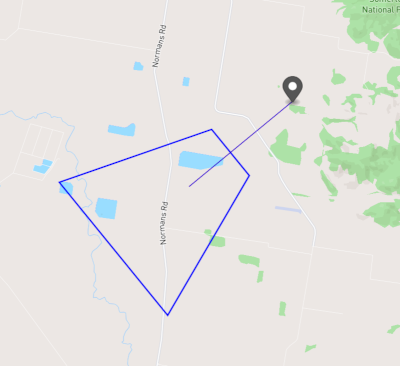
🌍 Get Last Packet as GeoJson
Command (GET)
http://localhost:2000/lastPacketGeoJson
Response
{
  "type": "FeatureCollection",
  "features": [
    {
      "type": "Feature",
      "geometry": {
        "type": "Point",
        "coordinates": [150.4909894385, -31.0454143356]
      },
      "properties": {
        "description": " Mission Id: test",
        "title": " Platform: 15HD BN-2T Mission Id: test",
        "name": "Sensor",
        "marker-symbol": "camera"
      }
    },
    {
      "type": "Feature",
      "geometry": {
        "type": "LineString",
        "coordinates": [
          [150.4909894385, -31.0454143356],
          [150.4476808153, -31.0759667079]
        ]
      },
      "properties": {
        "name": "CameraToTargetLine",
        "stroke-width": 1,
        "stroke-opacity": 1,
        "stroke": "#ff0000"
      }
    },
    {
      "type": "Feature",
      "geometry": {
        "type": "Polygon",
        "coordinates": [[[150.4386832153, -31.1221084079], [150.3933495153, -31.0744629079], [150.4570836153, -31.0555132079], [150.4728288153, -31.0720550079], [150.4386832153, -31.1221084079]]]
      },
      "properties": {
        "name": "Footprint",
        "stroke": "#0000ff",
        "stroke-width": 2,
        "fill-opacity": 0
      }
    },
    {
      "type": "Feature",
      "geometry": {
        "type": "LineString",
        "coordinates": [
          [150.4909894385, -31.0454143356],
          [150.4476808153, -31.0759667079]
        ]
      },
      "properties": {
        "name": "CameraToFrameCenter",
        "stroke-width": 1,
        "stroke-opacity": 1,
        "stroke": "#0000ff"
      }
    }
  ]
}
Rendered GeoJSON Output:
Open
Command (POST) - TS File Playback
http://localhost:2000/open/url?url=c:\movie\mymovie.ts
Command (POST) - Local HLS Playback
http://localhost:2000/open/url?url=c:\movie\stHls.m3u8
Command (POST) - HTTP HLS Playback
http://localhost:2000/open/url?url=http://localhost:8080/stHls.m3u8
Command (POST) - Stream Playback
http://localhost:2000/open/url?url=udp://227.0.0.1:30120
Response
Status (200) Ok
Load configuration
Command (POST) - Load config file
http://localhost:2000/load/cfgFilel?cfgFile=c:/movie/test.cfg
Response
Status (200) Ok
Play
Command (POST) - Start / Resume playback
http://localhost:2000/start
Response
Status (200) Ok
Pause
Command (POST) - Pause playback
http://localhost:2000/pause
Response
Status (200) Ok
Seek
Command (POST) - Seek to (time) position
http://localhost:2000/seek/position?position=10
Response
Status (200) Ok
Stop
Command (POST) - Stop playback
http://localhost:2000/stop
Response
Status (200) Ok
Close
Command (POST) - Close player
http://localhost:2000/close
Response
Status (200) Ok
Open Map
Command (POST) - Open Map window
http://localhost:2000/map/command?command=open
Load MilSymbols to the Map
Command (POST) - Load MilSymbols
http://localhost:2000/map/milsymbols
Body application/json
 {
    "name":"Layer",
    "type":"FeatureCollection",
    "crs": {"type": "name","properties": {"name": "EPSG:4326"}},
    "features":[
    {"type":"Feature","geometry":{"type":"Point","coordinates":[34.51337814331055, 31.576488011716833]},"properties":{"SIDC":"SHGPU------E***","name":"1.A","fullname":"1.H"}},
    {"type":"Feature","geometry":{"type":"Point","coordinates":[34.50325012207031, 31.56654278611756]},"properties":{"SIDC":"SHGPU------E***","name":"1.B","fullname":"1.B"}},
    {"type":"Feature","geometry":{"type":"Point","coordinates":[34.5355224609375, 31.557181604816563]},"properties":{"SIDC":"SHGPU------E***","name":"1.C","fullname":"1.C"}},
    {"type":"Feature","geometry":{"type":"Point","coordinates":[34.54822540283203, 31.546356567845027]},"properties":{"SIDC":"SHGPU------E***","name":"1.D","fullname":"1.D"}}
   ]
}