🎞️ Stream Recorder
StPlayer provides stream recording functionality in two modes:
- TS File Recording
- HLS (HTTP Live Streaming) Recording
Recordings can be segmented by size or duration and can optionally be GOP-aligned for smoother playback and segment switching.
⚠️ Note: Recording of RTP streams is not supported.
To begin recording (after activating stream playback), press the Record button:

While recording, relevant status info (e.g., total recorded size, current bitrate) is displayed.
If GOP-aligned segmentation is enabled, StPlayer will also notify of discontinuity errors when parsing the incoming stream.
📂 HLS Recording
HTTP Live Streaming (HLS) is an HTTP-based streaming protocol that enables reliable, cost-effective delivery of continuous and long-form video content over the Internet.
When in HLS Recording mode, StPlayer will:
- Split the incoming stream into .ts segments
- Generate and update an .m3u8 manifest file
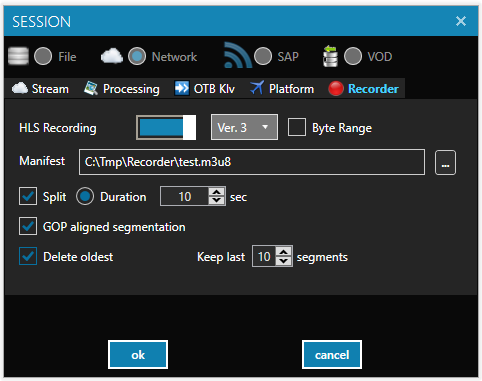
📄 Example: HLS Media Playlist (VOD)
#EXTM3U
#EXT-X-VERSION:3
#EXT-X-TARGETDURATION:10
#EXT-X-MEDIA-SEQUENCE:4
#EXT-X-PLAYLIST-TYPE:VOD
#EXTINF:10,
test_0_2018_07_12_12_45_08.ts
#EXTINF:9.8,
test_1_2018_07_12_12_45_19.ts
#EXTINF:10,
test_1_2018_07_12_12_45_29.ts
#EXTINF:4.8,
test_1_2018_07_12_12_45_39.ts
#EXT-X-ENDLIST
Segment files are saved in the same directory as the manifest.
Byte Range Support
Optionally, you can enable Byte Range mode for more compact manifests. When enabled:
- The manifest version will be automatically bumped to version 4
- Each segment will include a #EXT-X-BYTERANGE tag
#EXTM3U
#EXT-X-VERSION:4
#EXT-X-TARGETDURATION:11
#EXT-X-MEDIA-SEQUENCE:5
#EXT-X-PLAYLIST-TYPE:VOD
#EXTINF:10,
#EXT-X-BYTERANGE:6727768
test_0_2018_07_17_10_38_50.ts
#EXTINF:10,
#EXT-X-BYTERANGE:5949072
test_1_2018_07_17_10_39_01.ts
#EXTINF:10.04,
#EXT-X-BYTERANGE:5906772
test_2_2018_07_17_10_39_11.ts
#EXTINF:9.52,
#EXT-X-BYTERANGE:6426592
test_3_2018_07_17_10_39_21.ts
#EXTINF:3.48,
#EXT-X-BYTERANGE:1976256
test_4_2018_07_17_10_39_30.ts
#EXT-X-ENDLIST
⏱️ Segment duration is set using the Duration field in the config.
✅ Segments can optionally be GOP-aligned (if supported by the stream).
Please note, that the GOP alignment recording requires on-the-fly file parsing.
Playlist Type Behavior
The #EXT-X-PLAYLIST-TYPE tag defines whether a playlist is mutable or static:
Format:
#EXT-X-PLAYLIST-TYPE:<type>
Where
EVENT: Segments can only be added at the end (used during active recording)
VOD: Playlist is finalized and cannot be changed
During the recording, the playlist is set to be EVENT.
📄 Example: Live Recording Manifest (EVENT)
#EXTM3U
#EXT-X-VERSION:4
#EXT-X-TARGETDURATION:11
#EXT-X-MEDIA-SEQUENCE:3
#EXT-X-PLAYLIST-TYPE:EVENT
#EXTINF:10.4,
#EXT-X-BYTERANGE:6749388
test_0_2018_07_17_10_42_47.ts
#EXTINF:9.52,
#EXT-X-BYTERANGE:6327140
test_1_2018_07_17_10_42_57.ts
#EXTINF:10,
#EXT-X-BYTERANGE:6875724
test_2_2018_07_17_10_43_07.ts
Once recording stops, the manifest is finalized as VOD.
📦 TS Segment Recording
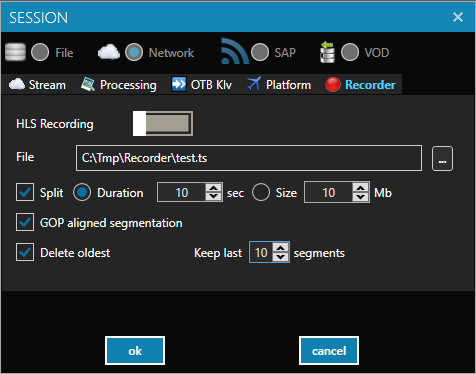
In TS Recording mode, the application can:
- Store recordings as .ts files
- Automatically delete older segments to:
- Stay within a maximum file count
- Respect a total storage size limit
🎯 GOP-Aligned Segmentation (H.264)
To ensure seamless segment switching, StPlayer supports cutting at GOP boundaries. This is especially useful when switching between non-consecutive segments.
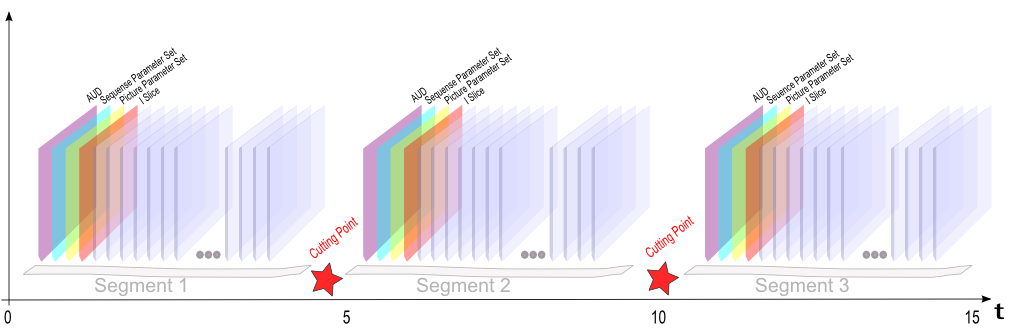
⚠️ Note: GOP-aligned segmentation is only available for MPEG-TS streams with H.264 video payloads.