🎯 Video Coverage
The Video Coverage query allows you to quickly locate relevant video segments by selecting an area of interest on the map.
The query visually highlights the exact points within the video timeline that correspond to the selected geographic region.
🧭 Example Scenario
Imagine you have a long surveillance video where the sensor follows a river.
The aircraft travels from inland to the ocean and then returns.
You're only interested in the segment where the river flows into the ocean.
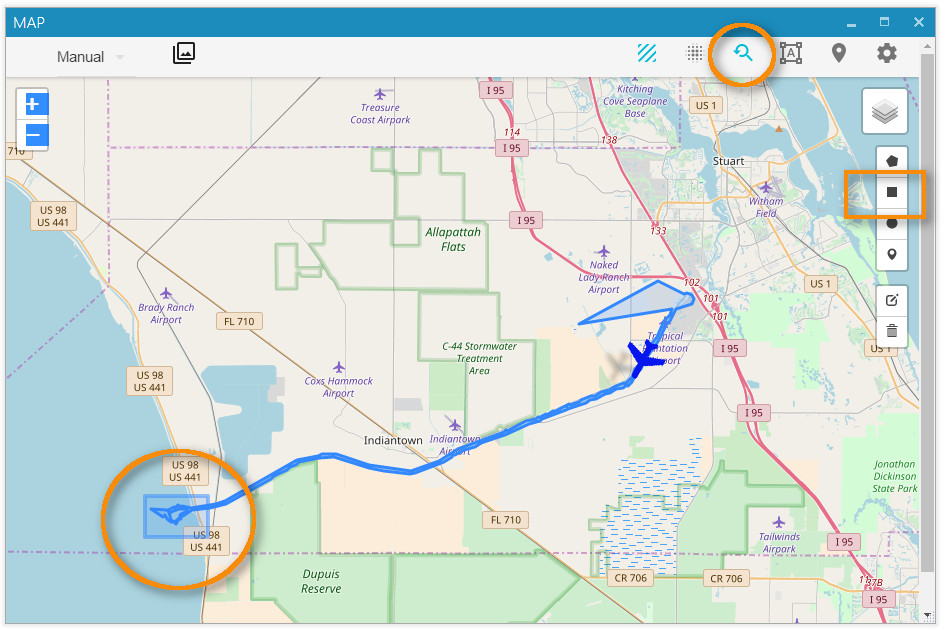
By selecting the Area of Interest on the map, StPlayer generates the following chart:
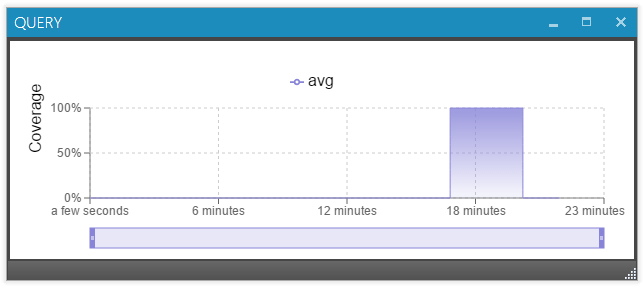
The chart shows that the relevant footage begins around 18 minutes into the video.
- Click on the start of the chart to jump to the beginning of the segment.
- Click on the end to go to the point where the aircraft exits the area.
📍 This feature is especially useful for analyzing large mission files efficiently and visually.