Export Formats
KLV Inspector can export selected packet ranges by packet number, file offset, or KLV time. This makes it practical to isolate a problematic segment of a recording and share or reprocess it elsewhere.
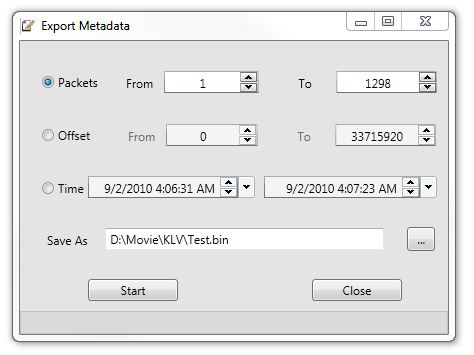
Figure: Metadata export dialog.
Supported Export Types
- Binary
- CSV
- XML
- JSON
Binary Export
Binary export writes one or more MISB 0601.x packets in encoded form without additional delimiters.
This is useful for regression tests, packet replay, and round-tripping into other tools.
CSV Export
CSV export writes packets as text. The first line contains MISB tag numbers followed by field descriptions.
Example header:
1. Checksum,2. UNIX Time Stamp,3. Mission ID,4. Platform Tail Number

Figure: Example CSV export opened in Excel.
Security Local Set In CSV
Security Local Set data is exported in column 48 as text.
Format rules:
- include the MISB 0102.x tag number followed by
. - separate items with
|

Figure: Security Local Set exported as CSV text.
Image Horizon Pixel Pack In CSV
Image Horizon Pixel Pack data is exported in column 81 as text.
Format rules:
- include
Start X0,Start Y0,End X1, andEnd Y1 - optional latitude and longitude fields may also be included
- separate items with
|

Figure: Image Horizon Pixel Pack exported as CSV text.
RVT And VMTI In CSV
RVT Local Data Set, Tag 73, and VMTI Local Data Set, Tag 74, are exported as Base64 strings in their corresponding columns.