Activation
The KLV Inspector demo is feature complete, but it limits which keys can be decoded and displayed until the application is activated.
To activate the application:
- Open the license page from
Options -> NodeInfoor the application licensing dialog. - Copy the displayed
NodeInfostring and send it to ImpleoTV for license generation. - When you receive the license file and activation key, return to the same page.
- Select the license file.
- Enter the supplied key.
- Click
Applyto validate and install the license.
note
If you cannot copy the node information directly, send the displayed node information exactly as shown so the generated license matches the target machine.
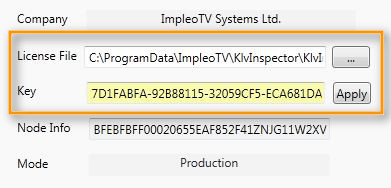
Figure: Activation page with license and node information.