WPF Demo Application
Windows Presentation Foundation (WPF) in Visual Studio provides a unified programming model for building desktop applications on Windows.
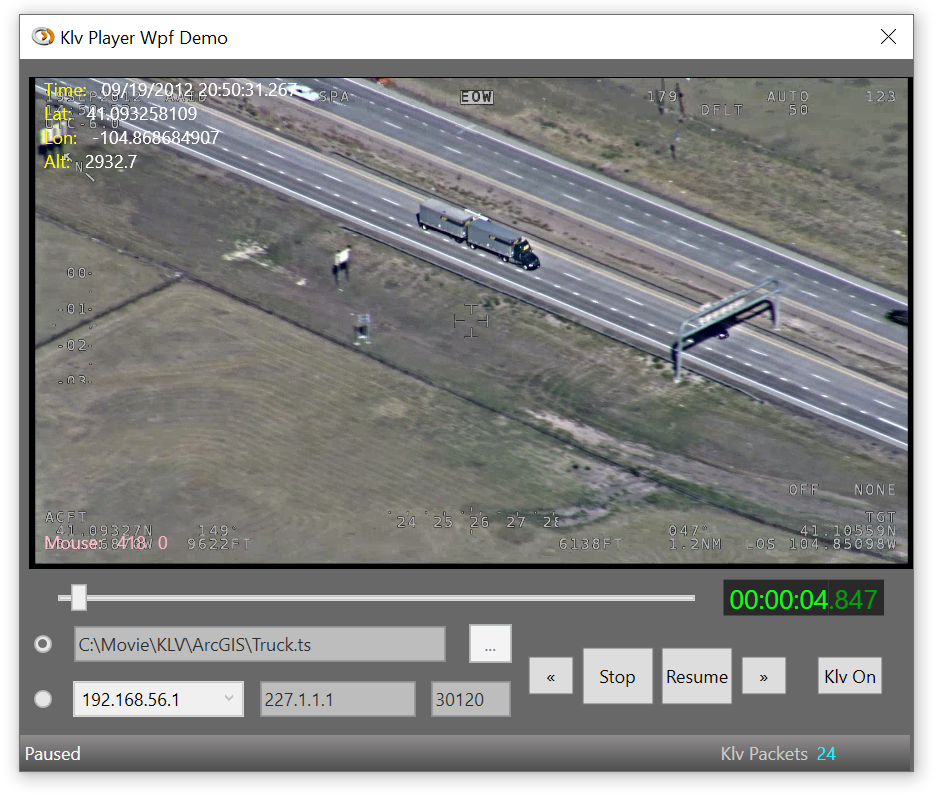
The STANAG Player SDK includes a WPF demo application that demonstrates basic STANAG file and stream playback.
Building the Demo Application
By default, the demo application is installed at:
C:\Program Files\ImpleoTV\StanagPlayerSdkNet\Samples\KlvPlayerDemoWpf
To build:
- Open the
KlvPlayerDemoWpfPrsolution or project - Build it as a 64-bit application (Debug or Release).
Assigning the Window Handle
The main difference from the console version is that WPF uses a WindowsFormsHost to embed a WinForms Panel, and the SDK is provided with the window handle.
XAML Example:
<WindowsFormsHost x:Name="hostWinForms" Background="#FF474747" Panel.ZIndex="1" Height="328" Width="583">
    <WinForms:Panel x:Name="VideoPanel"/>
</WindowsFormsHost>
Video Overlay
The WPF demo application includes a sample video overlay control that allows overlaying WPF controls on top of the video and reporting mouse position, among other features.
To use the overlay, place the KlvOverlayControl:AirspacePopup control above the WindowsFormsHost and insert your WPF elements as needed.
Example:
<KlvOverlayControl:AirspacePopup x:Name="AirspacePopup"
    PlacementTarget="{Binding ElementName=hostWinForms}"
    FollowPlacementTarget="True"
    AllowOutsideScreenPlacement="True"
    ParentWindow="{Binding RelativeSource={RelativeSource AncestorType={x:Type Window}}}"
    IsOpen="True"
    AllowsTransparency="True"
    Placement="Center"
    Width="{Binding ActualWidth, ElementName=hostWinForms}"
    Height="{Binding ActualHeight, ElementName=hostWinForms}">

    <Grid x:Name="OverlayGrid">
        <Border x:Name="OverlayBorder"
                Height="Auto"
                Width="Auto"
                Panel.ZIndex="11"
                MouseMove="OverlayBorder_MouseMove"
                MouseLeftButtonDown="OverlayBorder_MouseLeftButtonDown"
                Background="#01005000"/>

        <StackPanel Margin="10,0,0,0">
            <StackPanel Orientation="Horizontal">
                <TextBlock Foreground="Yellow">Time:</TextBlock>
                <TextBlock x:Name="KlvTime" Margin="10,0,0,0" Foreground="White"/>
            </StackPanel>
            <StackPanel Orientation="Horizontal">
                <TextBlock Foreground="Yellow">Lat:</TextBlock>
                <TextBlock x:Name="KlvLat" Margin="10,0,0,0" Foreground="White"/>
            </StackPanel>
            <StackPanel Orientation="Horizontal">
                <TextBlock Foreground="Yellow">Lon:</TextBlock>
                <TextBlock x:Name="KlvLon" Margin="10,0,0,0" Foreground="White"/>
            </StackPanel>
        </StackPanel>
    </Grid>
</KlvOverlayControl:AirspacePopup>