SRT forward error correction (FEC)
Forward error correction adds repair information to an SRT stream so the receiver can reconstruct some missing packets without waiting for a resend. Use it when packet loss disrupts video and your link has bandwidth available for redundancy. FEC is available for SRT inputs and SRT recast targets, including targets fed by Flywheel.
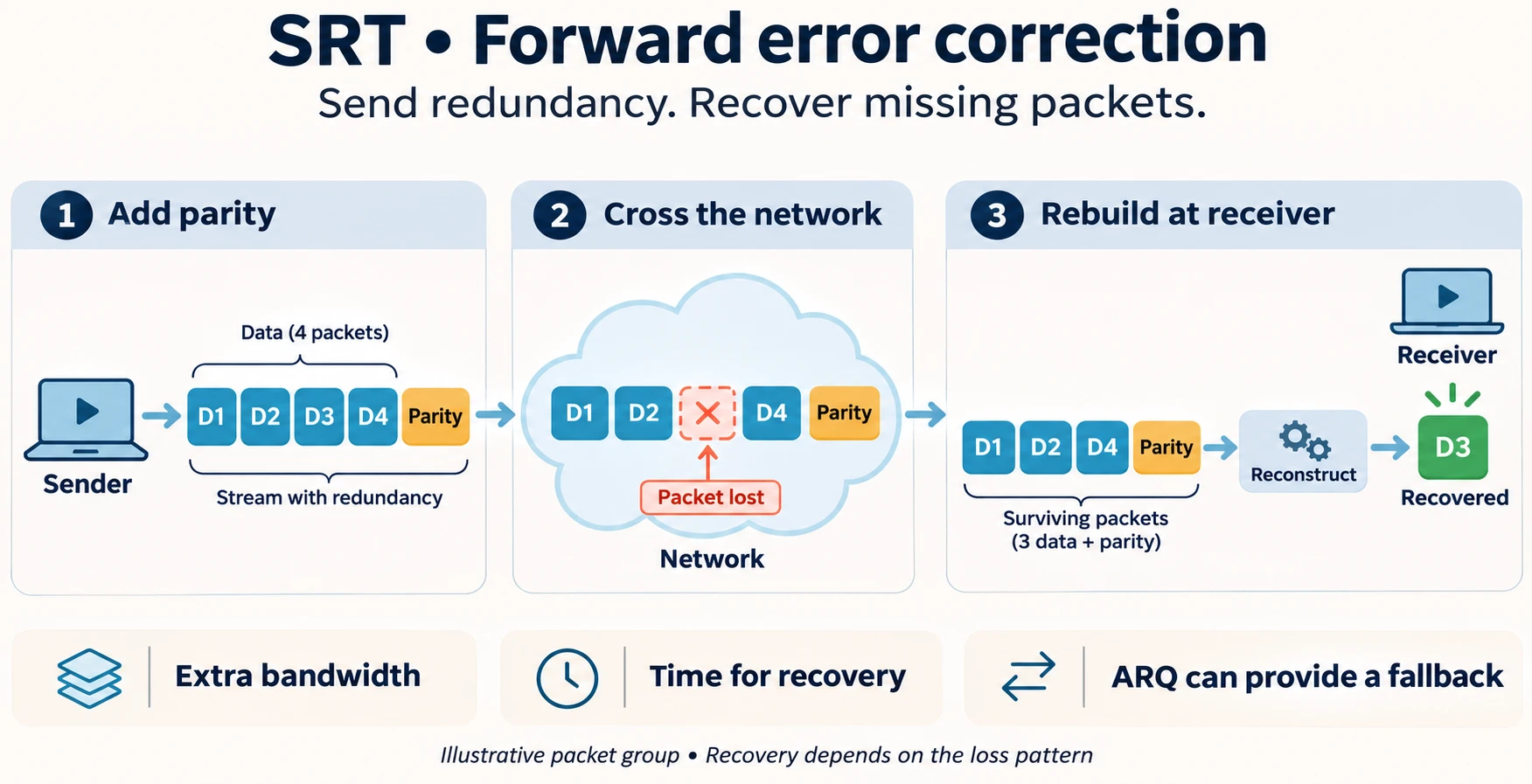
How FEC works
The sender computes parity from groups of media packets. When one packet in a protected group is missing, the receiver can rebuild it from the remaining packets and parity. Multiple losses in the same group may prevent recovery. SRT can combine FEC with automatic repeat request (ARQ), which asks the sender to resend missing packets. Recovery still needs time before the playback deadline. See the SRT FEC specification.
FEC trades bandwidth and buffering for resilience. It cannot repair every loss pattern or compensate for an overloaded connection. It does not change the video codec or replace encryption.
Open the configuration
For an input, edit a stream, select SRT as its type, and open the SRT tab. For an output, add or edit an SRT target in the stream's Outputs tab. Expand Forward error correction (FEC), this section is collapsed by default in both forms.
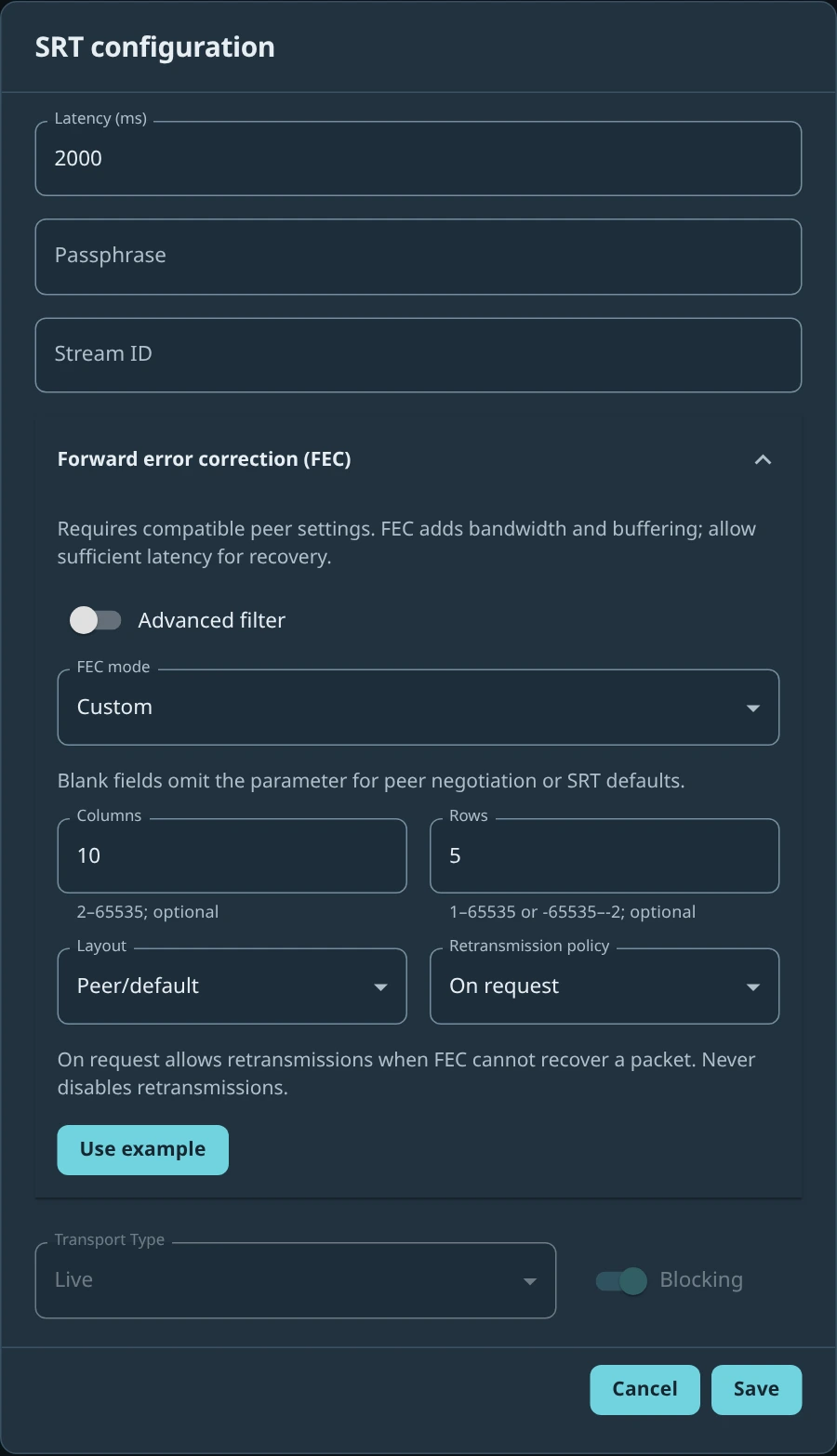
The image below shows the SRT configuration controls in a dialog, expanded in Custom mode with the example settings. Other fields in the surrounding stream or target dialog depend on which you are editing.
Choose an FEC mode
| Mode | What SkyView configures | When to use it |
|---|---|---|
| Off | An empty local filter. The default for new streams. | No locally specified FEC configuration. |
| Negotiate with peer | fec, with no matrix parameters. | The remote sender or receiver supplies the matrix. |
| Custom | fec plus the parameters you fill in. | Define the matrix locally or match an existing peer. |
Off does not force the remote peer to disable FEC. SRT can accept a filter proposed by the peer even when the local filter is empty. When FEC is requested, at least one peer must supply Columns: fec at both ends is insufficient. Parameters supplied at both ends must agree, conflicting values reject the connection. These are SRT filter negotiation rules.
Custom parameters
Blank numeric fields and Peer/default omit that parameter. They do not send zero or explicitly select a default. The peer may provide omitted values; otherwise the SRT library resolves its defaults. Set parameters explicitly at one end when you need reproducible settings across different peers.
| Control | Filter key | Definition and accepted values |
|---|---|---|
| Columns | cols | Packets per row, 2–65535. At least one peer must supply it. |
| Rows | rows | 1: row-only protection. 2–65535: row and column protection, with this many packets per column. -65535–-2: column-only protection; the absolute value is the column length, with no row parity. 0 and -1 are invalid. |
| Layout | layout | Even (even): aligned matrix blocks. Staircase (staircase): staggered column groups that spread parity transmission over time. Peer/default: omit the setting. |
| Retransmission policy | arq | Controls how retransmission cooperates with FEC; see below. Peer/default omits the setting. |
The row interpretation and limits follow the SRT FEC implementation. Layout describes packet grouping, not the arrangement of video frames.
Retransmission policy
| Policy | Behavior |
|---|---|
Always (always) | Request missing packets as soon as loss is detected, in parallel with FEC. |
On request (onreq) | Give FEC a chance first; request packets it cannot rebuild. Leave time for that fallback. |
Never (never) | Disable ARQ. Packets FEC cannot recover remain missing. |
These behaviors are defined in SRT's retransmission and FEC configuration.
Configure a pair of peers
- On the peer defining the matrix, select Custom and click Use example. This fills Columns: 10, Rows: 5, and Retransmission policy: On request, and leaves Layout unspecified.
- On the other peer, select Negotiate with peer. Alternatively, explicitly configure matching parameters on both peers.
- Save the target dialog if editing an output, then save the stream. Settings take effect when the stream next starts, including a restart caused by the existing update workflow.
- Confirm that the connection starts and video remains stable under representative network conditions. If connection setup fails, compare both peers' settings first.
Use example is an explicit action, not a preset automatically enabled for new streams. You can change every value afterward. Collapsing the section preserves edits; canceling the containing dialog discards unsaved changes.
Bandwidth and latency example
With 10 columns and 5 positive rows, 50 data packets have 5 row-parity and 10 column-parity packets: 15 / 50 = approximately 30% extra packets. This is parity packet overhead, not an exact wire bitrate calculation or a guarantee of correcting 30% loss. Budget additional capacity for headers and any retransmissions.
Larger groups reduce parity overhead but take longer to collect. Smaller groups generally produce parity sooner at higher overhead. Choose SRT latency that allows group completion and, with ARQ enabled, any needed round trip for retransmission. SkyView does not automatically adjust latency or bandwidth when you enable FEC.
Advanced filter editor
Enable Advanced filter to edit the same configuration as a raw string:
fec,cols:10,rows:5,arq:onreq
A column-only example with an explicit layout is:
fec,cols:10,rows:-5,layout:staircase,arq:onreq
Use lowercase names and supported values, at most 511 characters, with no whitespace, null characters, or duplicate keys. SkyView validates both editors. Invalid raw text remains editable and blocks saving; correct it before switching back to guided controls. Switching editors preserves omitted parameters, and opening the dialog alone does not rewrite saved settings.
For API integrations, input settings use srt.Packetfilter; SRT target engine configuration uses packetfilter. Off clears the local saved filter while leaving other SRT settings intact.
Troubleshooting
| Symptom | Check |
|---|---|
| Cannot save | Check field errors, numeric ranges, duplicate keys, and raw-filter syntax. |
| Connection rejected | Ensure at least one peer supplies Columns and shared parameters match. Verify the peer supports SRT FEC. |
| Loss remains visible | Check link capacity, loss bursts, group size, SRT latency, and whether ARQ is disabled. |
| Delay or network load increases | Account for parity traffic and recovery buffering; retest with smaller or less redundant groups as appropriate. |
Return to SRT input options for latency, encryption, and the other transport controls.